
Would you know if your website stopped delivering inquiries today?
Start with one customer action: open the site on your phone, find the service you need, and send a clearly labeled test inquiry. Then confirm the message arrives and that you can reply. That short test reveals more than checking whether the homepage loads.
Use this checklist to review the parts of your website that matter to your business. Record what you checked, the result, and who will handle any follow-up work.
Some checks take only a few minutes. Others require access to your hosting account or help from the person who manages your website.
Download the printable website health checklist. Keep a dated record of the result, the person responsible, and the next action. There is no email signup required for this download.
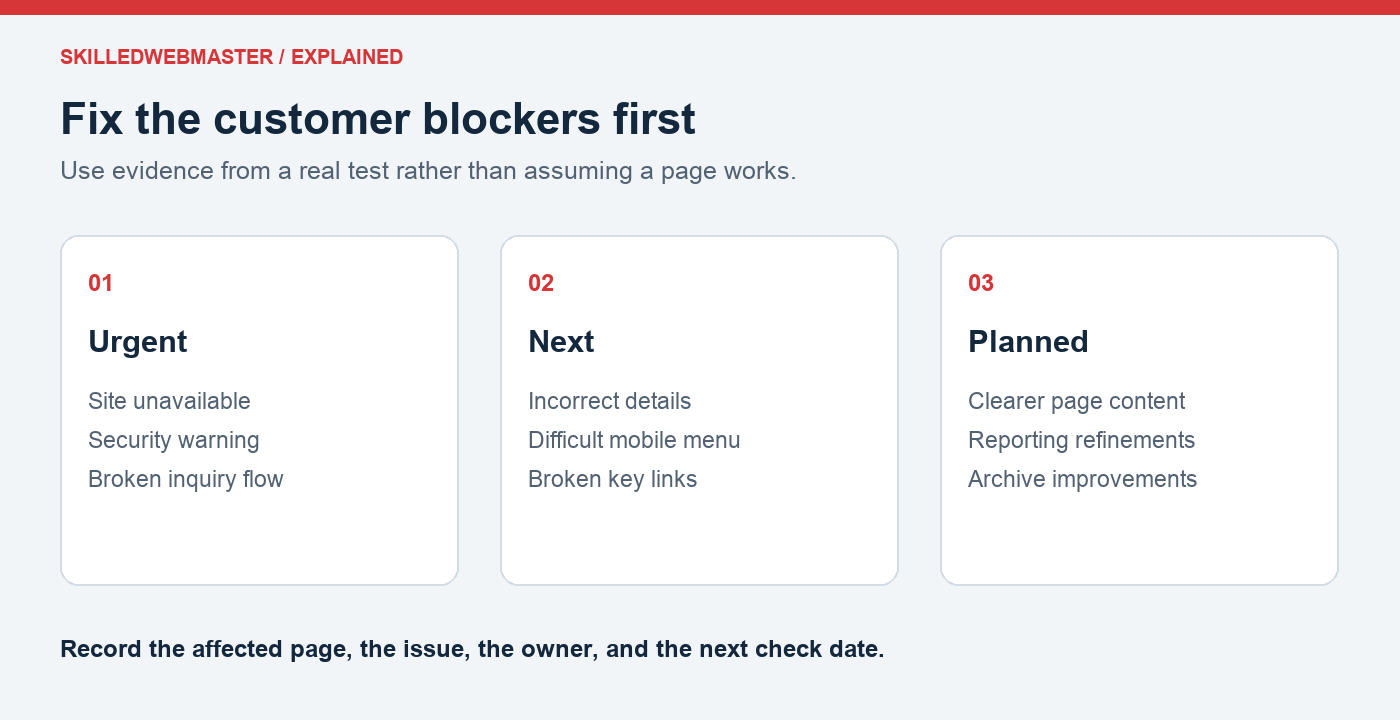
A first review: what should be fixed first?
Illustrative example: A local service business finds three issues: an inquiry never reaches its inbox, Saturday hours are outdated, and an older article has an unattractive banner.
The inquiry problem comes first because it blocks the action the business wants visitors to take. Incorrect hours come next because they can mislead a customer. The banner belongs in the planned-improvements list unless it hides information or prevents the page from working.
You do not need to redesign everything to make progress. Write down the problem, confirm it with a test, and assign the next step. This scenario is illustrative; it does not describe a customer or estimate lost revenue.
1. Can a visitor understand your business?
Open the homepage and ask someone unfamiliar with the business to review it.
- Is it clear what you provide?
- Is it clear who the service or product is for?
- Can visitors find the next step, such as contacting you or viewing products?
- Are service areas or location details easy to find when relevant?
If the page needs a verbal explanation, rewrite the main message in plain language. Give visitors a specific action that fits the page.
2. Does your contact form deliver messages?
Submit a clearly labeled test inquiry through the public website.
- Does the form accept the submission?
- Does the visitor receive a useful confirmation?
- Does the message arrive in the correct inbox?
- Can the recipient reply to the visitor’s address?
Check spam folders as well. A success message on the website does not prove the email was delivered.
If inquiries are missing, prioritize the problem and provide another working contact method while it is investigated. Do not include sensitive information in test submissions.
3. Does the website work on a phone?
Use a real phone to visit the homepage, a key service or product page, and the contact page.
- Can you open and close the navigation?
- Is the text readable without zooming?
- Are links and buttons easy to tap?
- Do images or banners cover important content?
- Can you complete the main action, such as sending an inquiry?
For an online store, check the purchasing journey using the platform’s supported testing method. Avoid placing an unintended live order simply to test the layout.
4. Is the business information current?
Check the information a customer relies on:
- Phone number and email address
- Hours and location
- Products, services, and prices where displayed
- Staff or contact names where relevant
- Booking links and downloadable documents
Also review older blog posts that direct customers to products or services. A helpful article can still lead to a dead end if its links are outdated.
5. Do important links work?
Follow the main navigation and the links that lead to inquiries, bookings, or purchases.
- Does each link reach the intended destination?
- Do external links still point to the correct provider or product?
- Are downloads available?
- Does a missing page offer useful navigation back into the site?
Prioritize broken links in the customer’s main journey before less-used archive pages.
6. Does HTTPS work without a warning?
Open the website using https:// and check for certificate or security warnings.
Test the addresses customers actually use, including www and any important subdomains. Certificate coverage for the main domain does not automatically cover every related hostname.
If a warning appears, record the exact error and contact the responsible provider. Do not ask customers to bypass a warning to use your site.
7. Is someone responsible for software updates?
For WordPress and similar platforms, identify who manages updates and how changes are checked.
- Are the platform, themes, and plugins maintained?
- Is unused software reviewed and removed when appropriate?
- Is there a backup and recovery plan before changes?
- Are key pages and forms tested afterward?
A list of available updates does not tell you whether installing all of them immediately is appropriate. The process should account for compatibility and the importance of the website’s functions.
8. Could the website be restored?
Ask the person responsible for backups:
- When was the last successful backup?
- Does it include the files and database the website needs?
- Is a copy available if the hosting account becomes unavailable?
- Has restoration been tested in a safe environment?
- How much recent information could be lost during recovery?
Do not perform a restoration over the live site just to test it. Use a separate environment and a documented process.
9. Does the business control its accounts?
Confirm appropriate access to domain registration, hosting, DNS, and the website administration account.
- Are renewal responsibilities documented?
- Are contact and payment details current?
- Are recovery methods available to the authorized owner?
- Has access for former suppliers or staff been reviewed?
- Are credentials stored securely?
If someone else registered your domain, confirm the arrangements for ownership and transfer. Treat account access as part of business continuity.
10. Can you tell whether the website is helping?
Choose measures that reflect the website’s purpose. These could include qualified inquiries, completed purchases, bookings, or visits to important pages.
Check that reporting tools are configured appropriately and that the business can access them. Search impressions and visitor counts can be useful, but they are different from customers acquired.
Keep a simple record of website changes and review results over time. This helps you decide where to focus the next round of improvements.
Decide what to fix first
| Priority | Examples | Next step |
|---|---|---|
| Urgent | Website unavailable, security warning, broken inquiry or purchase flow | Investigate promptly and provide a working alternative where possible |
| Next | Incorrect business information, difficult mobile navigation, broken key links | Assign an owner and schedule the correction |
| Planned | Content improvements, reporting refinements, less-used page updates | Add to the regular website work list |
For each issue, record the affected page, evidence, responsible person or provider, and the next check date. This makes the checklist a working tool rather than a one-time exercise.
Put a repeatable review in place
Repeat the checks after significant website changes and on a schedule that fits your business. A website that receives daily orders needs different attention from one that changes only occasionally.
Read What Does a Webmaster Do? to clarify which tasks you can manage internally and which responsibilities you may need to assign elsewhere.
For questions about your SkilledWebmaster hosting or account, contact support. If you are planning a new website, review the hosting options before choosing a plan.
If your review shows ongoing tasks with no owner, read What Does a Webmaster Do? to compare self-management and professional help. When contacting product support, include the affected address, the error or result you saw, and when you tested it. Do not include passwords.