
Updated October 14, 2026.
You have a business name and a website idea. Before you buy anything, it helps to answer three questions: which address will customers use, where will the website run, and who will provide email?
A custom domain name is a web address registered for your use, such as yourbusiness.com. It gives your business an address that does not depend on a website platform’s name.
For example, yourbusiness.com is a custom domain. An address such as yourbusiness.exampleplatform.com is a subdomain of the platform’s domain.
Registering a domain does not create a website by itself. It secures the name for a registration period, subject to the registry’s rules, and lets you connect that name to services such as a website or business email.
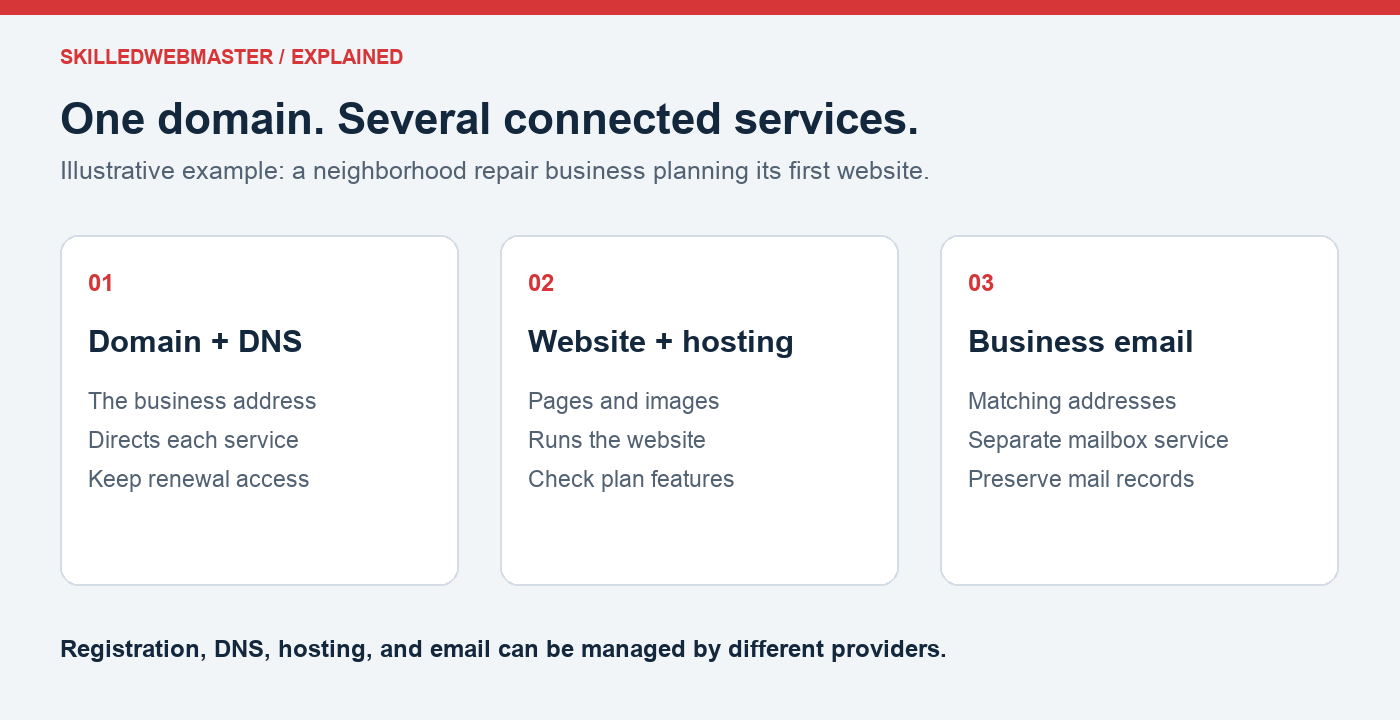
Plan the address before the purchase
Illustrative example: A neighborhood repair business wants a website with its services and a contact form. It also wants an email address that matches its name. Its shopping list has three parts: a domain registration, a website platform or hosting plan, and an email service.
If it buys only the domain, it has reserved an address; it has not yet created the pages or mailbox. If it later changes the website provider, its email can stay where it is, provided the email DNS records are preserved.
This example is a planning exercise, not a claim about a particular customer’s setup. Use the same exercise for your business: name each service, the provider, and who owns the account.
Download the domain-planning worksheet to compare names, record renewal costs, and plan website and email services before checkout.
Domain, hosting, and website: what is the difference?
Think of these as separate parts of your online presence.
| Part | What it does |
|---|---|
| Domain name | Provides the address people use, such as yourbusiness.com |
| Web hosting | Provides the environment where your website runs or its files are served |
| Website | Contains the pages, content, and features visitors use |
| DNS | Directs your domain and its subdomains to the appropriate services |
| Business email | Provides mailboxes using your domain, such as [email protected] |
Some plans bundle services, but you should check what is included. Purchasing a domain does not necessarily include hosting, a completed website, or an email mailbox.
Why use a custom domain for a business?
A custom domain gives you a consistent address to place on signs, business cards, proposals, and other marketing materials.
It can also support email addresses that match your business name. You need an email service and the correct DNS settings to make those addresses work.
Another benefit is flexibility. If you change website platforms or hosting providers, you can generally keep the domain and update where it points. The move still requires planning, especially if your domain also supports email.
A recognizable address works best alongside useful content, accurate business information, and a website that makes it easy for customers to take the next step.
How to choose a domain name
Start with the name customers already associate with your business. If it is unavailable, consider a clear variation that will be easy to say and type.
Before registering, check:
- Clarity: Can someone spell it after hearing it aloud?
- Length: Is it practical to use in an email address or printed material?
- Confusion: Does it resemble another business or a commonly mistyped name?
- Fit: Will it still describe the business if your services expand?
- Cost: What are the registration and renewal prices, including any premium designation or applicable fees?
Avoid choosing a name only because it contains a search phrase. It should work as a business address that customers can recognize and remember.
What should you check before purchasing?
Registration and renewal prices
An introductory price may differ from the renewal price. Review both before checking out, and understand the length of the registration term.
If you enable automatic renewal, keep payment information current. Also maintain an independent reminder so a failed payment or missed notice does not become a surprise.
Account control and registration details
Use an account controlled by the business or its authorized owner. Keep registration details accurate and document who has access.
If a supplier registers the domain for you, agree on ownership, access, and transfer arrangements before the purchase. Your business should not have to depend on an unavailable former supplier to renew its address.
Privacy and security options
Review which privacy protections are available for the domain extension and what is included in the purchase. Enable account security features such as multifactor authentication when available, and keep recovery methods current.
The services you will connect
Know whether you need a website, email, or both. Keep a record of the DNS settings each provider requires. Changing nameservers without preserving email records can interrupt mail even if the website still works.
How to register and use a custom domain
- Search for the name you want and review available alternatives.
- Check the registration term, renewal price, and included services.
- Register it using accurate details and an account you control.
- Complete any ownership or contact-verification instructions.
- Connect the domain to your website and email services using their required DNS records.
- Test the website address and email after setup.
- Record the renewal responsibility and keep account access secure.
You can use different providers for registration, DNS, hosting, and email. That flexibility is useful, but it makes documentation especially important.
Common questions
Can I have a domain before I build a website?
Yes. You can register an available domain while you plan the site. Registration does not mean a website is already published.
Can I use the domain with Microsoft 365 or another email provider?
Yes, if the provider supports custom domains. Follow its verification and DNS instructions, and confirm which subscription or mailbox services you need.
Is blog.yourbusiness.com a separate domain purchase?
Usually not. It is a subdomain that you configure under the domain you control. The blog still needs a hosting destination and valid HTTPS coverage.
Does buying a domain include HTTPS?
HTTPS availability depends on the website platform or hosting plan you choose. Check whether certificates are included, installed automatically, and renewed for you. The main website and any subdomains each need appropriate coverage.
Choose your business address
Search for a domain at SkilledWebmaster. Review the available name, registration term, and renewal details before purchasing.
If you have chosen a name but are unsure what else you need, use the worksheet to list your website and email requirements, then ask SkilledWebmaster support about the relevant product options. Product support and a custom website build are different services.
Already have a domain? Explore hosting options and read what a webmaster handles after launch to plan how your site will be managed.
Already running a website? Use the website health checklist to review its next steps.